
Windows 11 has introduced a new AI chat feature powered by ChatGPT in Command Prompt. This new capability, available in the Canary channel for Insiders, enables users to interact with a chatbot for generating commands, resolving errors, and receiving suggestions. According to WindowsLatest, this feature aims to streamline troubleshooting processes on the Microsoft OS.
Windows 11 Command Prompt now features ChatGPT.
The integration was recently introduced and functions as shown at the Build 2023 developer event.
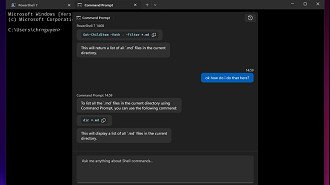
Access to the AI chatbot in Command Prompt on Windows 11 will be limited to those who receive an invitation to access the Azure OpenAI API, meaning that not everyone will have the opportunity to use it.
AI within the Command Prompt
To utilize the chat feature with Command Prompt AI, you must download and install the GitHub application on Windows 11. Afterwards, you are required to input your Azure AI endpoint and configure the Command Prompt settings before saving the changes.
The setup created connects the Command Prompt to the AI service, unlocking the chatbot’s full capabilities.
The AI’s suggestion can be directly copied to the Command Prompt entry line, allowing for a review of the commands before execution.
The Command Prompt can understand commands and provide context to the AI service, resulting in chatbot responses customized for the Command Prompt setting.

