
The new energy-saving feature, named energy saver, surpasses the current battery-saving mode in Windows 11. While the battery-saving mode stops power-draining functions temporarily, like email and calendar sync, live tile updates, and idle apps, energy saver further decreases system power usage, potentially impacting performance.
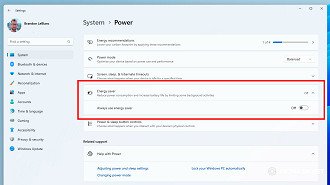
Energy saver is currently undergoing testing in Windows 11 Insider Preview Build 26002, allowing users to enable or disable it in Quick Settings or System Settings. Additionally, users can set it to activate automatically when the laptop battery reaches a specific percentage.
Desktop energy conservation
Microsoft is making this feature available for desktop computers that do not have a battery to help users save energy continuously. It’s important to keep in mind that decreasing power consumption on your desktop may lead to a dimmer screen.
Reducing the computer’s performance may not have a significant impact on energy usage at home, but it can make a difference for large corporations with many connected computers, benefiting the environment and reducing electricity consumption.

