

Chrome for Android will no longer override other password managers on website login pages, allowing users to seamlessly use third-party options like Microsoft Authenticator without dealing with Chrome’s pop-up window.
Third-party password managers are now fully compatible with Chrome on Android.

When using Chrome on an Android device, a prominent password manager window usually pops up at the bottom of the screen when visiting a login page. However, the developer version of Google Chrome is introducing a feature to allow the use of third-party password management applications as the default option. This update was shared by the user “Leopeva64” on the new Twitter-like platform “X”.
In Chrome for Android there is a new section called “Autofill Options” where you can choose whether to use Chrome or “other providers” to save and fill passwords, passkeys, payment methods, and addresses:https://t.co/CSspGsAiYO pic.twitter.com/DMsOZgKlbm
— Leopeva64 (@Leopeva64) November 12, 2023
Chrome for Android now includes a fresh feature called “Autofill Options” allowing users to select between Chrome and “other providers” for saving and autofilling passwords, passkeys, payment methods, and addresses.
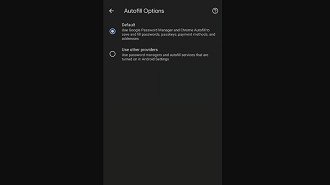
After selecting “Addresses and more” in Chrome settings for Android, a new button labeled “Autofill Options” will appear. Within this section, users can choose between “standard” and “use other providers” options. Opting for “other providers” enables the use of third-party applications for password management.
Introduction and release dates
The “self-filling options” feature of Chrome for Android is currently being tested in the app developer version and the timing for its release in the stable version is still unknown.

